FIAM Documentation
FIAM (Federated Identity and Access Management) provides identity, authorization and trust services for secure data sharing between organizations. It enables Data Providers to share data with Data Consumers only when the Data Owner has granted consent, in alignment with the EU Data Act and interoperable European data-sharing frameworks.
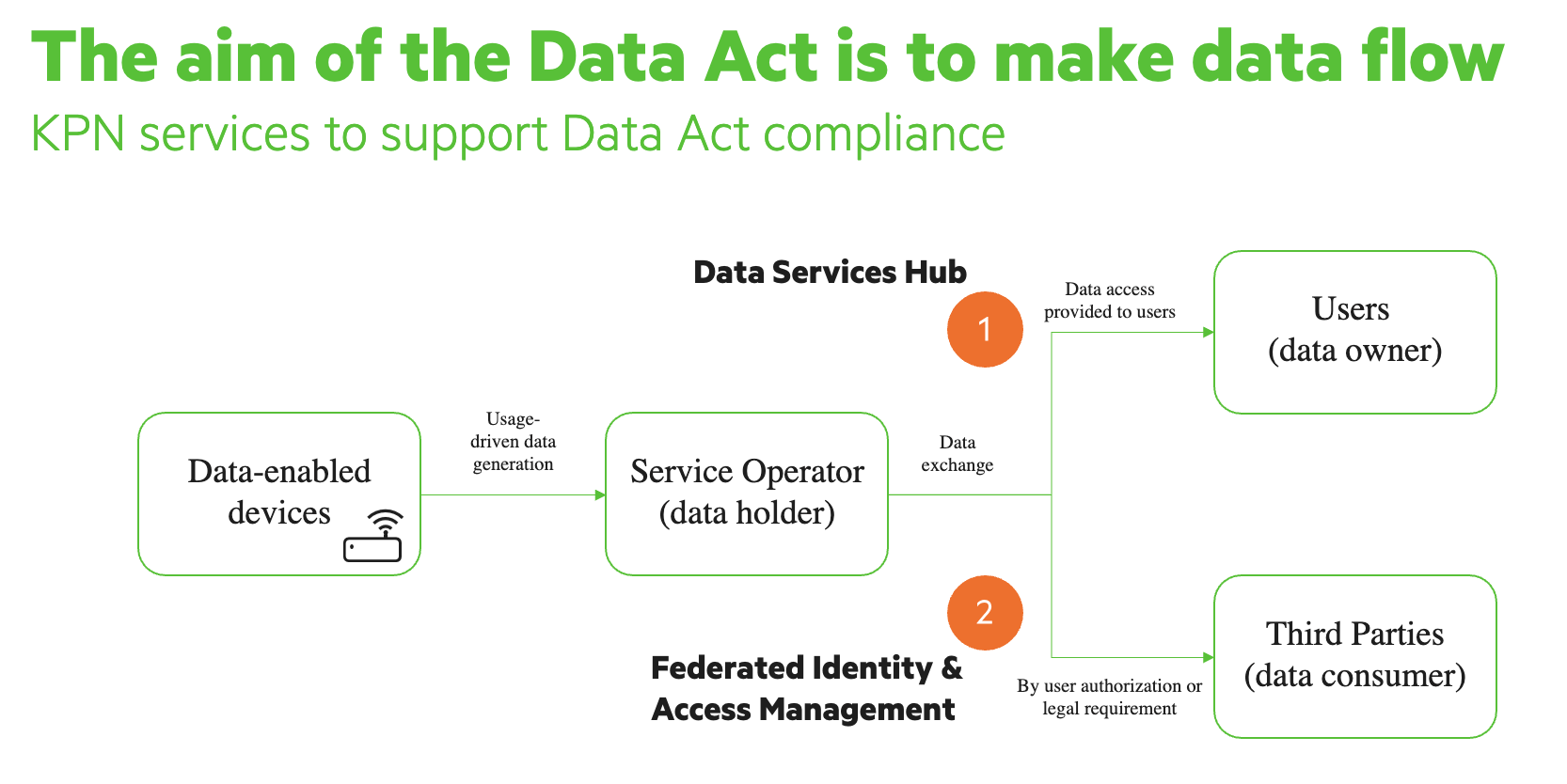
The FIAM APIs has specific APIs for Data Consumers and Data Providers to:
- Request a token that needs to be added in your header for authentication. Using a signed Client Assertion (JWS) and OAuth 2.0 Client Credentials flow.
- Management (REST) operations, for both Data Consumers and Data Providers.
API specification
Base URL
https://api-prd.kpn.com/fiam/api/v1
All requests must be sent over HTTPS.
Authentication
FIAM uses OAuth 2.0 Client Credentials + Client Assertion.
This ensures:
- Only verified organizations can access the ecosystem
- Machine-to-machine communication is cryptographically authenticated
- No manual actions are needed
Prerequisites
- Identity verified via eHerkenning. Your company needs to be registered in eHerkenning
- eSeal X.509 certificate and private key available, which is part of the onboarding process.
- Onboarding of your organization completed https://fiamonboarding.kpn.com/
Step 1: Create a JSON Web Signature (Client Assertion)
A client assertion is generated in the form of a JSON Web Token (JWT). This token encompasses the JWT header, the JWT payload (payload) encoded in JSON format, digitally signed to protect the authenticity and integrity of its data content.
Signed JWTs in FIAM MUST use and specify the RS256 algorithm in the alg header parameter.
Signed JWTs MUST contain an array of the complete certificate chain that should be used for validating the JWT’s signature in the x5c header parameter, including the root certificate of the issuing CA that is listed in the iSHARE Trusted List.
A JWT consists of three parts:
- JWT Header
- JWT Payload
- Signature
Example JWT Header:
Header (x5c contains the certificate chain):
{
"alg": "RS256",
"typ": "JWT",
"x5c": [
"<base64-leaf-cert>",
"<base64-intermediate-cert>",
"<base64-root-cert>"
]
}
Payload:
-
The JWT payload MUST conform to the private_key_jwt method as specified in OpenID Connect 1.0 Chapter 9, more information about JWT tokens and playloads can be found here https://www.jwt.io/introduction#when-to-use-json-web-tokens.
-
The JWT MUST always contain the iat claim.
-
The iss and sub claims MUST contain a valid Party Identifier of the party that creates and signes the JWT (unless specified otherwise).
-
The aud claim MUST contain a valid Party Identifier of the party receiving the JWT, which is the FIAM service.
-
The JWT MUST be set to expire in 30 seconds. The combination of iat and exp claims MUST reflect that. Both iat and exp MUST be in seconds, NOT milliseconds. See UTC Time formatting for requirements.
-
The JWT MUST contain the jti claim for audit trail purposes. The jti is not necessary a GUID/UUID. An new jti must be used for each JWT to avoid replay attacks.
{
"sub": "EU.EORI.KVKxxxxxx",
"iss": "EU.EORI.KVKxxxxxx",
"aud": "EU.EORI.NLKPNFIAMPROD",
"iat": 1730094300,
"nbf": 1730094300,
"exp": 1730099990,
"jti": "xxxxx-xxxxx-xxxxx"
}
Sign the assertion using the private key corresponding to your X.509 certificate. Where iss and sub is your party id that was generated during the onboarding process, and the aud is the ID of FIAM: "EU.EORI.NLKPNFIAMPROD".
Step 2: Request an Access Token
POST /oauth/token
Content-Type: application/x-www-form-urlencoded
grant_type=client_credentials \
&client_assertion_type=urn:ietf:params:oauth:client-assertion-type:jwt-bearer \
&client_assertion=<signed_jws>
Example response:
{
"access_token": "eyJhbGciOiJSUzI1NiIs...",
"token_type": "Bearer",
"expires_in": 360
}
Use in subsequent requests:
Authorization: Bearer <access_token>
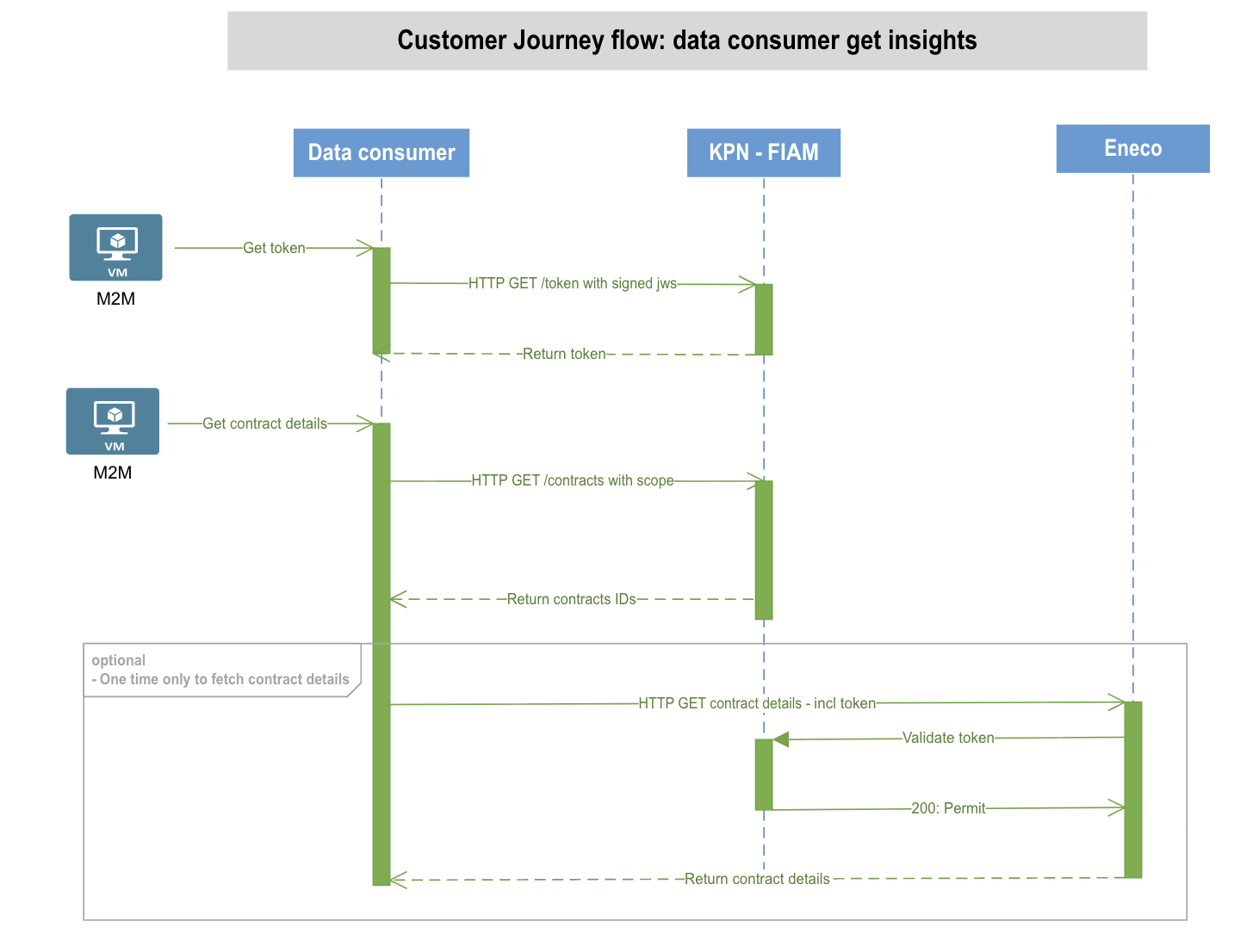
Request Flow Sequence
The following diagram shows the core interaction:
Meaning
- The Data Consumer proves its identity by signing the JWS.
- FIAM issues a short-lived token based on this proof.
- The Data Consumer calls FIAM APIs or Data Provider APIs using this token.
API Domains
FIAM APIs are grouped by functional domain.
1. Data Consumer
Use this API to retrieve information about given consents from Data Owners.
Get contracts
GET /service-consumers/contracts
Authorization: Bearer <access_token>
Example response (this will be subject to change):
{
"page": 1,
"page_count": 1,
"records": [
{
"action": "string",
"data_owner": "string",
"end_date": "2025-11-05T13:34:56.489Z",
"id": "string",
"resource": "string",
"resource_attribute": "string",
"resource_type": "string",
"service_consumer": "string",
"service_provider": "string",
"start_date": "2025-11-05T13:34:56.489Z"
}
],
"size": 1,
"total_count": 1
}
Response Codes
| HTTP Code | Meaning | Typical Cause |
|---|---|---|
| 200 | Successful request | — |
| 400 | Bad request | Missing fields, incorrect JSON, malformed JWS |
| 401 | Unauthorized | Token expired, invalid signature, wrong certificate |
| 403 | Forbidden | Identity is valid but authorization is missing |
| 404 | Not found | Unknown participant or no consent on record |
| 429 | Too many requests | Rate limit exceeded |
| 500 | Internal error | Temporary or unexpected system issue |
Summary
The FIAM APIs enforce a zero-trust model for data sharing:
- Who is requesting data is verified cryptographically
- What they want to access is validated against customer consent
- Every request is checked in real time
This ensures secure, transparent and compliant data exchange.